
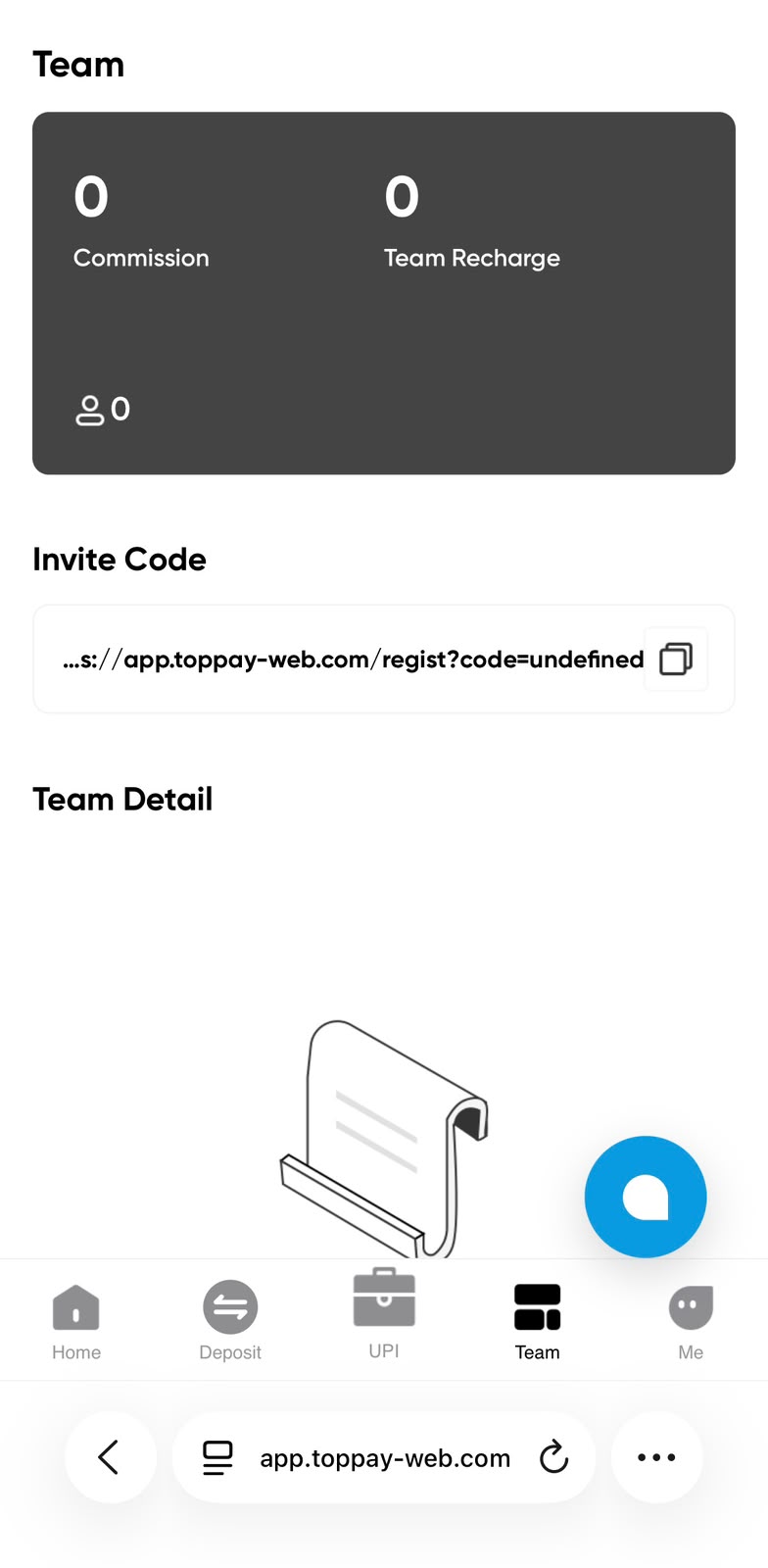
The TopPay Team screenshot shows a summary panel containing Commission, Team Recharge and a member count. Below the panel are an Invite Code section and a Team Detail section. A copy icon appears beside an invite link. This guide describes those controls and explains how to interpret the screenshot without confusing its account values with live figures for a different user.
Understand the team summary
Commission and Team Recharge are separate labels in the uploaded image. Do not treat either label as an unconditional promise of income. The figures on your account depend on the service’s current terms and recorded activity. If an amount changes or appears incorrect, compare the relevant history entries and dates before asking support for an explanation. Public screenshots are useful for locating a panel, but they cannot verify the balance, eligibility or activity of your own team.
Review an invite link before sharing it
The Invite Code area displays a registration address with a code parameter and a copy button. Use the link generated by your own account when you want to share an invitation. Check that the destination and invite code are complete after copying. The supplied screenshot contains an undefined code value, so that visible example should not be copied as a working invitation. This website’s registration guide links to the separate registration destination already supplied for the project.
Read team details and current conditions
The Team Detail area is where the application may display information associated with the team. An empty state in a reference screenshot does not prove that a current account has no members, and it does not establish why a particular entry is missing. Review any filters, dates or status explanations available in your signed-in screen. Before relying on a commission amount, read the applicable conditions, calculation method, processing times and any restrictions shown by the service.
Keep team assistance separate from account access
Helping someone find a registration guide does not require their password, verification code, recovery details or MPIN. Each person should create and control their own account credentials. If you share a link, describe where it leads and avoid presenting a screenshot’s balance or recharge amount as a prediction of someone else’s result. For account-specific problems, direct the account holder to the current support options in their own signed-in application rather than collecting their credentials.
Related TopPay guides
Continue with the TopPay app and screenshot guide, app download instructions, password help or customer care information. The USDT to INR calculator provides an estimate at a chosen rate; confirm current account terms before acting.
Commission, team recharge and invite tools
Quick answer
TopPay team and invite guide
The TopPay Team screenshot shows a summary panel containing Commission, Team Recharge and a member count. Below the panel are an Invite Code section and a Team Detail section. A copy icon appears beside an invite link. This guide describes those controls and explains how to interpret the screenshot without confusing its account values with live figures for a different user.
Who is this guide for?
People using the supplied TopPay screens to locate account controls and understand the next step before opening the signed-in service.
Search topics covered
This guide directly covers these related Toppay searches:
- TopPay team and invite guide
Key checks
- Use your own account and review the current instructions.
- Treat uploaded screen values as reference examples.
- Keep passwords, PINs, OTPs and authenticator keys private.
Common questions
Is the screenshot invite link ready to use?
The displayed example includes an undefined code, so it should be treated as a reference to the layout. Copy and review the current invite link from your own account. The registration guide on this website explains the existing project registration destination separately.
Are Commission and Team Recharge the same?
They are different labels in the supplied Team screen. Their exact definitions, qualifying conditions and calculation rules should be checked in the current service. A public guide cannot determine the meaning of a particular account transaction from a screenshot alone.
Does the Team page guarantee rewards?
No. A dashboard layout and a screenshot do not guarantee income or a reward. Review current terms, eligibility, fees and records before relying on an amount. The task examples and calculator elsewhere on this website are arithmetic illustrations, not predictions of account results.
Last updated: 12 October 2026 · Read the disclaimer